Affordable Web Design for Small Business: A How-To Guide
By Dori Fussmann · August 24, 2026
Stop Shopping for a Price Before You Know the Problem
The most expensive mistake a small business owner can make when pursuing a website redesign is getting a quote before doing a diagnostic. Most providers are happy to give you a number — but that number is attached to whatever scope they assumed, not the scope that will actually move your business forward. Before you open a single browser tab to search for web designers, spend thirty minutes auditing the specific problems that are costing you leads.
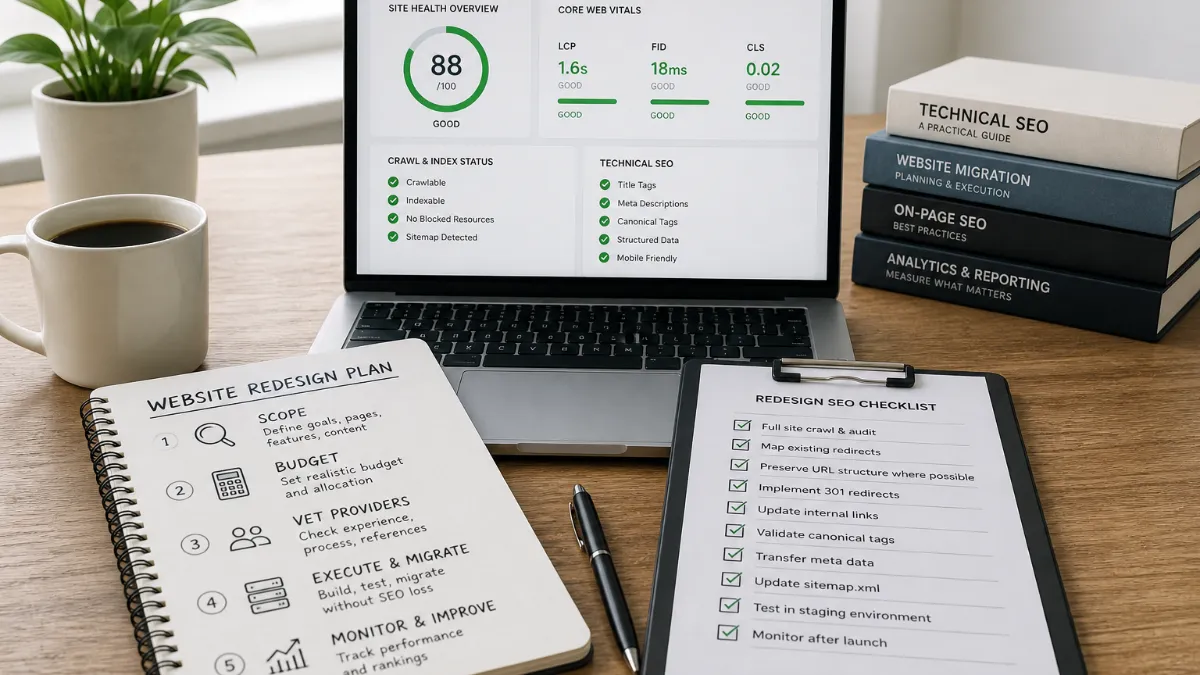
Start with your Core Web Vitals — the standardized metrics Google uses to measure real-world user experience. Run your current site through Google’s free PageSpeed Insights tool and note three numbers: Largest Contentful Paint (how fast the main content loads, with a target under 2.5 seconds), Interaction to Next Paint (how quickly the site responds to clicks, targeting under 200 milliseconds), and Cumulative Layout Shift (how stable the page is as it loads, targeting under 0.1). If you fail all three, you have a performance problem that goes far deeper than a visual refresh. Next, check mobile responsiveness on your actual phone. Over 60% of web traffic now comes from mobile devices, and a site that does not adapt to smaller screens creates friction and drives users away. Also crawl your site for broken internal links, missing meta descriptions, and pages with no structured data — these are the issues that quietly suppress your search visibility month after month, regardless of how good your services are.
Document every problem you find. That list becomes your redesign brief, and it’s worth far more than any mood board.
Build a Value-Based Budget, Not a Price-Anchored One
Once you understand what’s broken, you need a budget — but anchor it to value, not to the cheapest quote you can find. Cheap redesigns often cost more in the long run through lost leads, poor rankings, and rework fees. The better mental model is to ask what one additional qualified lead per month is worth to your business. For a plumber whose average job is $800, two extra calls per month from organic search is worth nearly $20,000 per year. For a dentist, it’s more. For an attorney, considerably more. Viewed through that lens, a well-executed rebuild priced in the mid-four-figures is not an expense — it is one of the highest-leverage investments on the table.
Website redesign costs for small businesses in 2026 range from roughly $500 for a DIY rebuild to $15,000 or more for a professional agency project, with the number of pages, level of customization, SEO setup, and platform choice being the biggest drivers of cost. That spread is wide, but your diagnostic work narrows it considerably. A service business with ten to fifteen pages — home, services, about, contact, a handful of location or service-area pages — sits firmly in the lower half of that range when the project is scoped cleanly and the client supplies their own content.
One pricing dynamic worth understanding before you sign anything: redesigns typically cost 15–25% more than equivalent new builds because of the migration, URL mapping, and content preservation work that comes with replacing an existing site — and planning for that premium upfront is what separates projects that finish on budget from ones that don’t. A provider who quotes you as though they’re building from scratch on a blank canvas is either omitting the migration work or planning to skip it, and skipping it is how businesses lose their organic rankings.
How to Vet Providers Before You Commit
When you approach a provider with your diagnostic list and your value-anchored budget, the conversation itself is your vetting tool. Ask specifically about page speed scores, structured data implementation, XML sitemaps, and SEO migration — meaning 301 redirects and preserved metadata. Affordable website design services should include basic SEO foundations from day one: fast loading speeds, clean code, mobile-friendly design, and keyword-focused titles. A provider who cannot speak fluently to these topics is unlikely to deliver a rebuild that improves your search visibility, no matter how polished the design looks in a browser.
Ask to see before-and-after PageSpeed scores from recent client projects — not mockup screenshots, but actual Lighthouse data. Ask how they handle URL changes: do they produce a 301 redirect map before launch, or do they “handle it at the end”? Handling it at the end is usually code for not handling it. Ask whether the finished code is yours to own outright or whether it lives on a proprietary platform. Some low-cost providers hold your domain, hosting, or site files hostage and demand high exit fees — so ensure you maintain 100% ownership of your digital assets from day one.
Also ask about post-launch support. Look for packages with clear pricing, no hidden fees, mobile-friendly design, and ongoing support including security updates and backup options to avoid expensive problems down the road. The launch is not the finish line; it’s the starting line for your new site’s organic growth, and you want to know who answers the phone when something breaks in month two.
Fixed-price engagements deserve particular attention as a budget-protection mechanism. Affordable doesn’t have to mean cheap or unreliable — plenty of companies now offer flat monthly pricing instead of massive upfront fees, bundling design, hosting, and updates into one predictable bill. Whether you choose a fixed-price rebuild or an ongoing managed arrangement, the key is that the scope is written down and agreed before work begins, not discovered as the project unfolds.
Protect Your Rankings During the Rebuild
Your current website, however slow or ugly, has built up some organic equity. It has pages indexed by Google, some with inbound links, some with established positions for local queries. A careless rebuild can destroy that equity in days. A careful one preserves it and builds on it.
Website redesigns typically cause a 10–25% traffic dip in the first 30 days, with recovery taking two to eight months depending on migration complexity — and success requires comprehensive pre-launch crawl audits, meticulous 301 redirect mapping, and intensive post-launch monitoring. None of that is particularly complicated, but every step must be completed in order and before the new site goes live, not after.
The process is sequential. First, crawl your existing site and export every URL — every page, every image path, every canonical URL — before a single file is moved. Second, build your redirect map: for every URL that will change in the new site, document the old URL and its exact new destination. Third, implement those 301 redirects in the new build and test each one before launch. Fourth, verify the new site in Google Search Console and submit an updated XML sitemap on the day of launch. Review on-page content changes to ensure keyword optimization wasn’t removed during the redesign, and compare title tags, meta descriptions, header tags, and body content between old and new versions of key pages.
Core Web Vitals regression — particularly Largest Contentful Paint and Cumulative Layout Shift — causes ranking drops independent of redirect issues, so if your new platform loads slower than the old site, rankings may decline even with perfect redirect implementation. This is the subtler trap: a site can have a beautiful new design, flawless redirects, and still underperform in search because the new build is slower than the creaky old one. Performance must be tested before decommissioning the old site, not after.
Measure What Actually Matters After Launch
The temptation after a redesign is to evaluate it aesthetically. The site looks better, the team is proud of it, clients compliment it — and then three months later, the phone rings at the same rate it always did. That is not an affordable redesign. That is an expensive one.
In 2026, user patience is at an all-time low and search engine algorithms are more unforgiving than ever — Google no longer evaluates your website based on how pretty it looks, but on real-world user experience data quantified through Core Web Vitals. So measure accordingly. Set up Google Search Console and Google Analytics (or an equivalent) before the new site launches, and track the same metrics after launch so you have a clean before-and-after comparison. The metrics that matter are organic sessions, goal completions or form submissions, and Core Web Vitals scores in the field (not just the lab).
Give the new site eight to twelve weeks before drawing firm conclusions — search engines need time to re-crawl and re-index the rebuilt site, and ranking movements often lag the technical improvements by a month or more. Expect five to fifteen percent traffic fluctuation in the first thirty days, with recovery to ninety-five to one hundred percent of baseline by weeks eight to twelve for properly executed migrations. If you’re still significantly below baseline after twelve weeks, that’s the signal to audit your redirect implementation and crawlability — not to panic, but to investigate methodically.
A rebuild that generates the same leads it always did is a design project. A rebuild that generates meaningfully more qualified organic leads is a growth investment. Only one of those is worth calling affordable.
The Case for Having It Done for You
Every step in this guide is executable by a motivated business owner. The diagnostic tools are free, the redirect logic is learnable, and Google Search Console is accessible to anyone. The honest question is not whether you can do it — it’s whether doing it yourself is the best use of the same hours you’d otherwise spend on the work that actually runs your business.
AI-powered search surfaces — including Google AI Overviews, Perplexity, and ChatGPT search — are increasingly citing web content directly, and the sites that get cited share common characteristics: structured data markup, clear authorship signals, fast load performance, and content that directly answers specific questions. Getting all of those elements right simultaneously, while also managing the SEO migration, requires a coordinated process that most business owners simply don’t have bandwidth to run in parallel with their actual business.
That’s the genuine case for Perfect AI Websites. The scoping, migration planning, technical build, structured data, and content seeding described throughout this guide don’t have to be your project to manage — they can be the deliverable you receive. Every step in this article is exactly what Perfect AI Websites executes on behalf of clients: a transparent, fixed-price rebuild on modern infrastructure, engineered for both traditional search and the AI discovery layer that is increasingly where new customers begin their search. If you’ve read this guide and recognized your own website in the problems it describes, the most efficient next step is a conversation about scope — not another round of research.
Where Things Stand
The affordable website redesign market for small businesses remains active and price-competitive heading into late 2026, with recent data and reporting pointing to a few meaningful shifts. Benchmark data published this summer indicates that redesigns consistently cost 15–25% more than equivalent new builds once SEO migration work — URL mapping, redirect implementation, and content preservation — is properly scoped and included, a premium that catches many small business owners off guard when mid-project invoices arrive. On the technical side, the maturation of Core Web Vitals standards continues to raise the bar: recent guidance confirms that Largest Contentful Paint, Interaction to Next Paint, and Cumulative Layout Shift scores must be treated as acceptance criteria built into the development brief, not metrics checked after launch. There is also a growing emphasis on AI search visibility as a redesign objective in its own right: sites with structured data markup, fast load performance, and content that directly answers specific questions are increasingly being cited by AI-powered surfaces such as Google AI Overviews and AI chat tools, adding a new performance dimension that providers who cannot speak to structured data and Answer Engine Optimization are not yet equipped to deliver. No major regulatory or platform changes affecting small business web design were announced in the past 45 days.
Further reading: small business website redesign · affordable web design for small business · affordable website redesign · affordable website redesign · best website design small business.
Sources: Affordable Website Development for Small Business · Web Design & Management Services for Small Businesses · The Best Small Business Website Design Options In 2026.
Frequently asked questions
How do I know if my site actually needs a redesign or just some SEO fixes?
Run a free PageSpeed Insights test and crawl your site with a tool like Screaming Frog (free up to 500 URLs). If your mobile Lighthouse performance score is below 60, you have broken internal links, or your pages have no structured data or XML sitemap, a rebuild is likely more cost-effective than patching. If the structure is sound but your content is thin, targeted SEO work alone may be enough.
What should I insist on keeping during a website redesign?
Insist on three things: (1) a complete URL map exported before work begins, (2) 301 redirects implemented for every URL that changes, and (3) all existing title tags and meta descriptions preserved or improved — not deleted and rewritten from scratch. These three safeguards are what separate a redesign that preserves organic traffic from one that destroys it.
Is a fixed-price rebuild actually cheaper than an hourly agency engagement?
For a well-scoped small business site, fixed-price rebuilds almost always cost less in total because scope creep — the main driver of budget overruns — is contractually capped. Hourly engagements can be reasonable when the scope genuinely cannot be defined upfront, but for a standard service-business site of 10–20 pages, the scope is almost always predictable enough to price flat.
How long does a professionally executed website redesign typically take?
Most small business rebuilds — 10 to 20 pages, no custom integrations — run four to eight weeks from kick-off to launch when content is supplied by the client. The most common cause of delays is content bottlenecks: the client hasn't gathered photos, written service descriptions, or confirmed which pages to keep. Having your content organized before the project starts can cut the timeline nearly in half.
Related
Sources
About the author

Founder, The Night Ventures
Dori Fussmann is a seasoned finance and operations executive with deep expertise in entrepreneurship, business strategy, and data-driven decision-making. As Chief Financial Officer of BlueMark, Dori leads the firm's financial strategy and planning, operational excellence, and growth execution – helping ensure the organization's continued leadership in impact verification and intelligence. Before joining BlueMark, Dori was the Founder and CEO of The Vets, a U.S. home pet care company. Earlier in his career, Dori spent several years in investment banking at Citi, Ion Pacific, and Morgan Stanley, advising on mergers and acquisitions, IPOs, and strategic financing transactions across consumer and technology sectors. Dori also serves as a mentor in Cornell Tech's Runway Startups Program, supporting early-stage founders working on applied technology solutions. Dori also serves as a mentor in Yale's Tsai Center for Innovative Thinking (Tsai CITY) Thematic Mentoring Program, advising student founders and venture teams on business model development, go-to-market strategy, product positioning, and commercialization pathways. Fluent in English and Hebrew and proficient in German, Dori earned dual degrees in Accounting and Business Management (B.A.) and Law (LL.B.) from the Interdisciplinary Centre (IDC) Herzliya.
SEO Web Design
Design and development with search architecture, technical SEO, performance, and content structure built into the foundation.