SEO Site Audit: A Step-by-Step Guide for Small Businesses
By Dori Fussmann · August 24, 2026
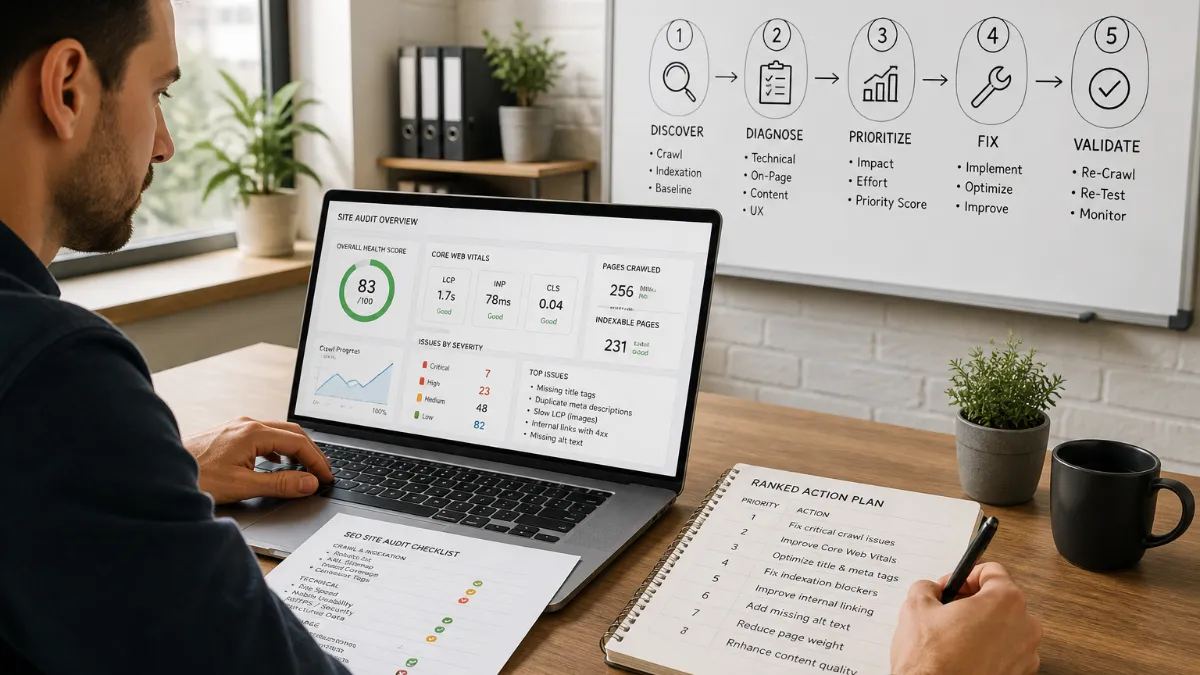
Running a technical SEO site audit sounds like something that requires an agency retainer and a rack of enterprise software. It does not. What it requires is a clear sequence of steps, a small stack of mostly free tools, and the discipline to prioritize findings rather than catalog them. This guide walks through exactly that process — five sequential phases that take a small business website from unknown baseline to a ranked action plan you can actually execute.
Before You Touch Any Tool: Establish Your Baseline
Every audit begins with data access, not data collection. If Google Search Console (GSC) and Google Analytics 4 (GA4) are not installed and verified on your site, stop here and set them up first. Google Search Console remains the foundation — it shows you exactly what Google sees, including indexation status and crawl errors. GA4 tells you what real visitors do after they arrive. Without both, you are auditing in the dark: any findings you surface will lack context, and you will have no reliable way to measure improvement after you make fixes.
Once GSC and GA4 are confirmed, take ten minutes to note your current baseline numbers: total indexed pages, average organic clicks per week, top five landing pages by organic traffic, and your site’s current Core Web Vitals status in GSC’s Experience report. Write these down. They become your before snapshot, and you will need them to demonstrate progress later.
No single tool covers everything — the practical answer is a stack, not one platform. For a small business site, that stack is: Google Search Console (free), Google Analytics 4 (free), Screaming Frog SEO Spider (free tier crawls up to 500 URLs, which covers the majority of small business sites), and PageSpeed Insights (free). For backlinks, Ahrefs Webmaster Tools provides a meaningful free tier. That is your full toolkit for this audit.
Phase 1: Crawlability and Indexation
Technical SEO forms the foundation of a healthy website. If Google cannot crawl or understand your pages, your content may never reach potential customers. Open GSC and navigate to the Coverage report (now called the Indexing report in some account views). You are looking for pages marked as “Excluded,” “Error,” or “Valid with warning.” Common culprits: pages accidentally blocked by robots.txt, URLs returning soft 404s, or duplicate content being excluded via canonical tags that were set incorrectly.
Next, run a crawl with Screaming Frog. Export the results and filter for: broken internal links (4xx responses), redirect chains longer than two hops, pages missing title tags, and pages with duplicate or missing meta descriptions. These are your crawlability and indexation findings. Categorize each one as Critical/Fail (Google cannot access or correctly index the page), Needs Improvement (Google can index it but something is degrading its value), or Pass. That three-tier system is essential. Don’t try to fix everything at once. Instead, group fixes by impact and effort. High-impact, low-effort changes go first — fixing crawl errors and improving top-page content.
Phase 2: Core Web Vitals and Mobile Performance
Open PageSpeed Insights and test your homepage, your most important service page, and your contact page. You want field data (real-user measurements from the Chrome User Experience Report), not just lab data. Core Web Vitals now include INP: LCP under 2.5 seconds, INP under 200 milliseconds, and CLS under 0.1 are the 2026 thresholds Google rewards in rankings. Any page failing these thresholds on mobile gets a Critical/Fail rating.
Because all sites are now indexed based on their mobile versions, even a slight dip in mobile-friendliness can trigger a site-wide ranking drop. Run each test URL twice — once for desktop, once for mobile — and record both scores. Pay attention to the specific diagnostics PageSpeed surfaces, such as render-blocking resources, unoptimized images, and unused JavaScript. These diagnostics are the mechanism behind the score; fixing the mechanism is what improves performance, not chasing the number itself.
If multiple pages fail Core Web Vitals and the root cause is consistently traced to theme overhead, uncompressed images across the whole site, or heavy third-party scripts baked into the platform, flag that pattern. It matters at the end of the audit.
Phase 3: On-Page Elements — Titles, Descriptions, Headings, and Internal Links
Return to your Screaming Frog export. Filter by pages that are indexable (status 200, no noindex tag) and review four things systematically:
Title tags: Every page needs a unique, descriptive title tag between 50 and 60 characters that includes the primary keyword naturally. Missing titles, duplicate titles, or titles over 60 characters (which Google will rewrite) are Needs Improvement or Critical findings depending on page importance.
Meta descriptions: These do not directly affect rankings, but they shape click-through rates from search results. Flag any page that is missing a meta description or has one that is duplicated from another page. Review meta titles, descriptions, headers, and keyword usage — even the smallest optimization can make a big impact on click-through rates.
Heading hierarchy: Each page should have exactly one H1 that matches the topic of the page, followed by a logical H2/H3 structure. A page with no H1, or three competing H1s, sends mixed signals about what the page is actually about.
Internal link structure: GSC’s Links report shows which of your pages attract the most internal links. Pages you want to rank — your service pages, your contact page, your location pages — should be receiving meaningful internal links from other pages on your site. Pages with zero internal links pointing to them are effectively orphans; Google rarely prioritizes content it cannot discover through its own crawl of your site.
Phase 4: Content Gaps and Thin Pages
In 2026, a strong SEO content audit is less about counting keywords and more about checking whether each page deserves to rank. Open GSC’s Performance report and sort pages by impressions descending. Look for two patterns: pages with high impressions but low click-through rates (the page is appearing in search but the title or description is failing to earn the click) and pages with very low impressions despite covering a topic central to your business (a content gap — either the page does not exist or it is too thin to surface).
Thin pages are any page where the content is too shallow to fully answer the intent behind the search query. For a service business, a thin page might be a service page with two paragraphs and a contact form — technically indexed, but unlikely to earn a ranking for any meaningful query. After the March 2026 core update, thin pages, copied ideas, and weak intent matching are harder to hide. You need content that solves the searcher’s problem, supports the next click, and reflects real business knowledge.
For the content gap portion, list the three to five core topics your business should rank for that you are currently not appearing in the top 20 results for. These become inputs for your post-audit content plan.
Phase 5: Backlinks and Local Citation Consistency
Use Ahrefs Webmaster Tools to pull your backlink profile. You are not chasing a high domain rating — you are looking for two things: whether any toxic or spammy links are pointing at your site (a flag to investigate, though rarely a crisis for small business sites) and whether local, relevant sources — your chamber of commerce, local directory listings, industry associations — are linking to you. A strong site audit always checks your backlink quality. Identify toxic or spammy links that might hurt your reputation.
For local service businesses, citation consistency matters as much as link quantity. Your NAP — name, address, and phone number — must be identical across your website, your Google Business Profile, and any directory listings. Inconsistencies confuse both Google’s local ranking systems and AI systems that aggregate business information from multiple sources. Check your top five external citations manually and flag any that differ from your website’s contact page.
The AI-Readiness Check: The Phase Most Audits Skip
In today’s landscape, an audit must bridge the gap between traditional search engine visibility and the requirements of generative AI agents. For a small business website, this means three concrete checks that most templated audit guides omit entirely.
First, structured data. Open Google’s Rich Results Test and run your homepage, a service page, and your contact page through it. Does your site implement LocalBusiness schema? Does it include your business name, address, phone, hours, and service area in machine-readable JSON-LD format? Does it use FAQ schema on pages that answer common customer questions? Schema markup has evolved from rich-result candy to core AI-citation infrastructure. In 2026, structured data signals help AI Overviews, ChatGPT Search, and Perplexity decide what to quote.
Second, NAP consistency across external profiles. This is not just a local SEO concern — it is an AI accuracy concern. When an AI system assembles an answer about your business from multiple sources, conflicting phone numbers or addresses produce either a wrong answer or no mention at all. Consistency is how you become reliably citable.
Third, answer-ready content. Since large language models now power search, your content must be structured for citation, not just ranking. This means having clear entity relationships and structured data that helps AI systems understand your expertise and trustworthiness. Review your service pages: do they directly answer the specific questions someone would ask an AI assistant — “What does an HVAC tune-up include?” or “How long does a roof replacement take?” — or do they describe your business without answering anything?
Building the Action Plan: Ranked, Not Listed
The output of your audit should not be a PDF of screenshots or a spreadsheet with 170 rows of equal weight. A list without prioritization is not actionable — it is paralyzing. A complete framework serves business owners seeking measurable improvements. You’ll gain actionable insights and a prioritization framework that focuses resources on high-impact fixes.
Rank every finding by its expected impact on traffic or leads, then pair each finding with a specific corrective action. A ranked action plan entry looks like this: Critical — Homepage is not mobile-passing on Core Web Vitals (LCP: 4.1s). Fix: Compress hero image, defer render-blocking scripts. Expected impact: Restores mobile ranking eligibility for highest-traffic page. That is one actionable item. Fifty of those, ranked by impact, is a usable plan. A flat list of 170 errors with no next step attached is not.
Group your findings into three horizons: fixes you can implement in the next two weeks, improvements that will take one to three months, and structural issues that may require platform-level changes. That third category — structural or platform-level findings — deserves its own honest conversation.
When the Audit Reveals the Platform Is the Problem
Some findings from a technical SEO audit are genuinely quick fixes. A missing meta description, an uncompressed image, a broken internal link — these take minutes to an hour to resolve. But some findings point to something deeper.
When your audit consistently surfaces Core Web Vitals failures rooted in a bloated theme, crawlability issues caused by how your CMS generates URLs, or structured data that cannot be implemented cleanly because the platform does not support it, you are not looking at a content problem. Traffic loss isn’t always about content quality. It is often the result of “technical debt” — the accumulation of outdated code, broken redirects, and slow-loading assets that eventually breaks the connection between your site and your audience. Patching individual symptoms on a structurally weak platform is a holding action, not a fix.
This is where the audit serves its most important function: it tells you honestly whether incremental improvements will close the gap, or whether the gap exists because the foundation itself needs to be replaced. When the evidence points to the latter, rebuilding the site on modern, performance-first infrastructure is not a luxury — it is the only path to lasting organic growth. That is exactly the problem Perfect AI Websites was built to solve: taking the website and brand you already have, rebuilding it on a fast, technically excellent foundation engineered for both Google and AI-powered search, and giving you a site where every audit finding from this point forward is actually fixable.
Where Things Stand
August 2026 has been an unusually active month in the SEO landscape, making regular technical audits more urgent than ever for small businesses. Google officially launched its August 2026 spam update, a global adjustment designed to improve search quality by identifying sites that violate its spam policies. Separately, a broad core ranking update that began on August 8, 2026 has already shifted rankings for many sites , with pages carrying significant technical debt — outdated code, broken redirects, and slow-loading assets — absorbing disproportionate losses. Google is simultaneously giving site owners more visibility into AI search performance, expanding Search Console’s generative AI reporting, and continuing to push search toward a model where being surfaced, cited, or summarized matters alongside the traditional organic click. On the tooling side, Cloudflare launched its AEO Visibility Dashboard in early access on August 6 , measuring whether AI assistants mention or cite a brand — a sign that AI-readiness tracking is rapidly becoming a mainstream audit category. For small business owners, the combined effect of algorithm volatility and expanding AI search surfaces makes running a structured, prioritized technical audit not a periodic exercise but an ongoing operational need.
Further reading: technical SEO audit · seo site audit cost · seo site audit tool · seo site audit · what is seo site audit.
Sources: How to Conduct a Technical SEO Site Audit · How to Do an SEO Audit · Website Audit Tool: Automated SEO Audit ⚙ 115+ Checks.
Frequently asked questions
How long does a technical SEO site audit take for a small business website?
For most small business websites under 50 pages, a thorough five-phase audit — covering crawlability, Core Web Vitals, on-page elements, content gaps, and backlinks — typically takes three to five hours when using free tools like Google Search Console, Screaming Frog's free tier, and PageSpeed Insights. The time-consuming part is not the data collection; it's triaging findings into a prioritized action plan. Budget an additional hour or two to sort issues by impact and pair each one with a specific fix.
Do I need paid tools to run a meaningful SEO site audit?
No. Google Search Console and Google Analytics 4 are free and provide the most authoritative data available — real Google data on what is indexed, what earns clicks, and where crawl errors exist. Screaming Frog's free tier crawls up to 500 URLs, which is sufficient for most small business sites. PageSpeed Insights is free and gives you Core Web Vitals field data. For backlinks, Ahrefs Webmaster Tools offers a meaningful free tier. Paid tools add depth and automation, but the five-phase process in this guide can be completed entirely with free tools.
What is an AI-readiness check and why does it belong in a small business SEO audit?
An AI-readiness check evaluates whether AI-powered search systems — like Google's AI Overviews, ChatGPT Search, and Perplexity — can find, parse, and confidently cite your business. Practically, this means checking whether your site implements LocalBusiness, FAQ, and Service structured data schemas; whether your NAP (name, address, phone number) is consistent across all pages and external profiles; and whether your service pages answer the specific questions these AI systems surface for your category. For a local service business, being cited in an AI Overview can deliver qualified leads without a single organic click.
What should I do if my audit reveals that the platform itself is the problem?
Some audit findings — a broken title tag or a missing meta description — are quick fixes. But when the audit consistently surfaces slow load times rooted in bloated theme files, crawl errors caused by a poorly structured CMS, or Core Web Vitals failures that stem from how the platform renders JavaScript, the problem is the infrastructure, not the content. At that point, patching individual issues rarely produces lasting results. The more effective path is rebuilding the site on a modern, performance-first framework so that every fix sticks and future improvements are far easier to make.
Related
Sources
About the author

Founder, The Night Ventures
Dori Fussmann is a seasoned finance and operations executive with deep expertise in entrepreneurship, business strategy, and data-driven decision-making. As Chief Financial Officer of BlueMark, Dori leads the firm's financial strategy and planning, operational excellence, and growth execution – helping ensure the organization's continued leadership in impact verification and intelligence. Before joining BlueMark, Dori was the Founder and CEO of The Vets, a U.S. home pet care company. Earlier in his career, Dori spent several years in investment banking at Citi, Ion Pacific, and Morgan Stanley, advising on mergers and acquisitions, IPOs, and strategic financing transactions across consumer and technology sectors. Dori also serves as a mentor in Cornell Tech's Runway Startups Program, supporting early-stage founders working on applied technology solutions. Dori also serves as a mentor in Yale's Tsai Center for Innovative Thinking (Tsai CITY) Thematic Mentoring Program, advising student founders and venture teams on business model development, go-to-market strategy, product positioning, and commercialization pathways. Fluent in English and Hebrew and proficient in German, Dori earned dual degrees in Accounting and Business Management (B.A.) and Law (LL.B.) from the Interdisciplinary Centre (IDC) Herzliya.
SEO Web Design
Design and development with search architecture, technical SEO, performance, and content structure built into the foundation.